Email open rate is the percentage of successfully delivered recipients recorded as opening an email. It remains useful for directional engagement analysis, but modern privacy features mean a recorded open is not the same thing as verified human reading. The most useful workflow combines the formula with consistent campaign scope, benchmark context and downstream metrics such as CTR, CTOR, conversion rate and ROI.
What Email Open Rate Measures
Email open rate measures the share of delivered recipients for whom the email platform recorded an open event. At a high level, it answers a simple question: of the people who successfully received the message, how many were recorded as opening it?
The metric is most useful as an engagement and diagnostic indicator. It can help compare subject lines, sender recognition, audience segments, campaign types and historical trends. It does not directly measure reading depth, purchase intent, revenue or profitability, so a strong open rate should be interpreted alongside later stages of the email funnel.
Email Open Rate Formula
Email open rate formulas
Email Open Rate = Unique Opens / Delivered Emails x 100Unopened Delivered Emails = Delivered Emails - Unique OpensUnique Opens per 1,000 Delivered = Unique Opens / Delivered Emails x 1,000Target Opens = Delivered Emails x Target Open RateMailchimp defines email open rate using successful deliveries as the denominator. This is important because bounced messages were not successfully delivered and therefore should not be treated as recipients who had the opportunity to open the email.
Unique Opens vs Total Opens
For a recipient-level open rate, use unique opens. A recipient who opens the same email five times still represents one unique opener. Total opens, by contrast, can count repeated activity from the same recipient and can therefore exceed the number of unique openers.
Mixing total opens into a unique-recipient formula can make the rate misleading. If your email service provider reports both metrics, use unique opens for the standard open-rate calculation and total opens only when you intentionally want to study repeat opening behavior.
Delivered Emails vs Sent Emails
Sent emails include all delivery attempts. Delivered emails exclude known failures such as hard and soft bounces according to the provider's reporting rules. Because open rate is meant to describe recipients who could receive the message, delivered volume is the cleaner denominator.
This also keeps open rate separate from email bounce rate. Bounce rate diagnoses delivery failure; open rate begins after successful delivery.
How Email Open Tracking Works
Email platforms commonly record opens when remote content associated with a message is requested. A tiny tracking image or equivalent mechanism allows the platform to infer that the message was opened or rendered by an email client.
That mechanism is useful but imperfect. Image blocking, caching, privacy proxies, preloading and client-specific behavior can all change what gets recorded. The reported metric should therefore be read as recorded open activity under the provider's measurement method, not as a direct measurement of human attention.
Tracking Pixels and Remote Images
A tracking pixel is usually a very small remote image unique to a campaign or recipient. When the email client requests that image, the email platform may register an open. If the image never loads, a real human open can go unrecorded. If a privacy system or client preloads the image automatically, an open can be recorded without a conventional human open event.
This is why two campaigns should be compared using the same provider, tracking settings and audience conditions whenever possible.
Apple Mail Privacy Protection and Open Rates
Apple Mail Privacy Protection is designed to make it harder for senders to learn about a recipient's Mail activity. Apple states that the feature prevents senders from seeing whether a message was opened and hides the recipient's IP address. In practice, this changed the reliability of traditional pixel-based open tracking for a large share of Apple Mail users.
Klaviyo's current benchmark guidance explicitly warns that Apple MPP can inflate open-rate reporting because Apple may load email content in a privacy-preserving way. For this reason, modern open rate is best used as a directional metric rather than a perfect read-receipt system.
Why Recorded Opens Can Be Inflated or Incomplete
Open-rate data can be distorted in both directions. Automated image fetching or privacy preloading can create opens that do not correspond to deliberate reading, while blocked images or text-only viewing can hide genuine opens. Subscriber device mix can therefore influence reported rates even if actual attention does not change.
A sudden jump or drop should trigger a measurement check before a strategic conclusion. Review provider changes, privacy-segment mix, audience composition and tracking settings alongside creative factors.
Worked Email Open Rate Example
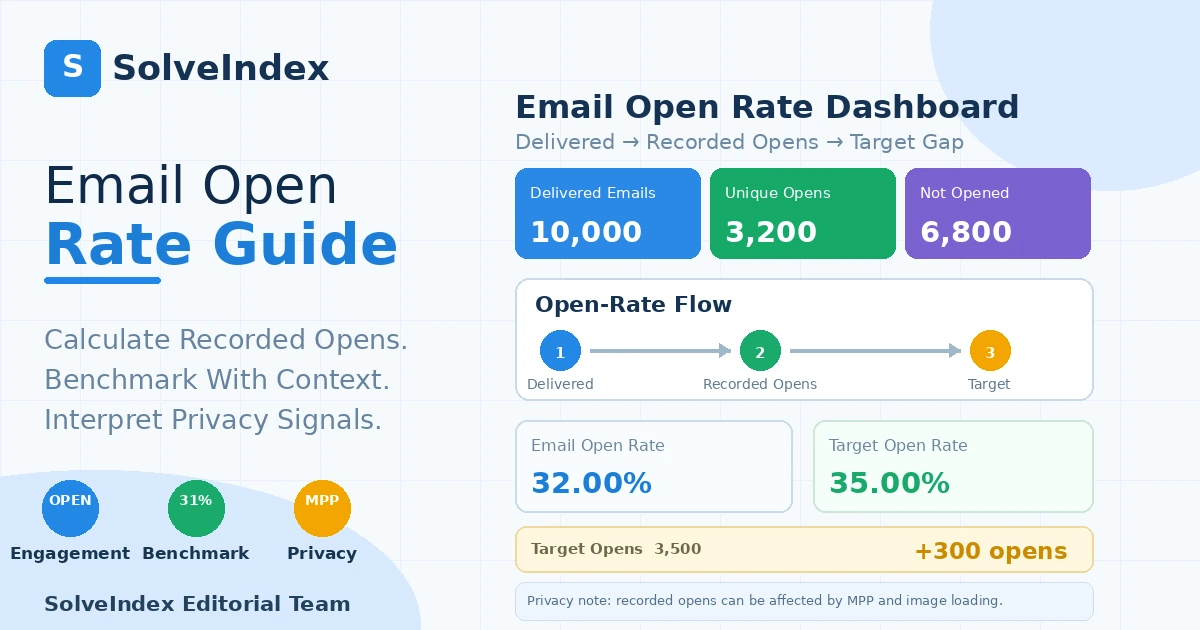
Suppose 10,000 emails are successfully delivered and 3,200 unique recipients are recorded as opening. The email open rate is 3,200 divided by 10,000, or 32.00%. The remaining 6,800 delivered recipients have no recorded unique open.
At a 35% planning target, 3,500 unique opens would be required. The difference between the target and current result is 300 additional recorded opens. That gap is useful for scenario planning, but it does not guarantee that generating 300 more opens would produce the same downstream clicks, conversions or revenue.
How to Use a Target Open Rate
A target is most useful when it is based on comparable historical campaigns or a relevant peer benchmark. A promotional blast, newsletter, onboarding flow and cart-recovery automation can have very different audience intent and expected behavior.
The calculator's default 35% target is an example value, not a universal recommendation. Replace it with a rate appropriate for your audience, campaign type and reporting environment.
What Is a Good Email Open Rate?
There is no single good email open rate for every sender. List quality, industry, campaign type, relationship with the audience, sender recognition, subject line, geography and privacy-device mix all affect the recorded percentage.
Use three layers of context: your own recent history, the same campaign type or segment, and an external peer benchmark. A rate above a generic industry average can still be weak for a highly engaged automation, while a lower rate can be acceptable for a broader or colder audience.
2026 Email Open Rate Benchmark Context
Klaviyo's 2026 ecommerce benchmark analysis reports an average 31.0% campaign open rate across industries, with the top 10% of campaigns around 45.1%. Automated flows averaged about 32.2%, with the top 10% around 45.8%.
Those numbers are useful context, not a universal target. The dataset is specific to Klaviyo customers and ecommerce-oriented reporting, and open tracking is affected by Apple MPP. Benchmark methodology matters as much as the headline percentage.
Email Open Rate by Industry
Industry differences in the same 2026 Klaviyo dataset are meaningful but not enormous. Campaign averages include roughly 33.1% for clothing and accessories, 31.2% for food and beverage, 32.5% for home and garden, 30.5% for health and beauty, 29.4% for automotive and 29.3% for electronics.
Use an industry figure only when the sender type, campaign definition and reporting method are reasonably comparable to yours. A benchmark from another platform or audience may use different measurement rules.
Campaigns vs Automated Flow Open Rates
One-off campaigns and behavior-triggered automations serve different purposes. Automated flows often reach users at a more relevant moment, such as after sign-up, browse behavior or cart activity. Their open-rate expectations should therefore be compared with other flows rather than with every broadcast campaign.
Keeping campaign type separate also makes optimization more actionable: a weak newsletter open rate may call for audience or subject-line work, while a weak onboarding-flow rate may point to timing, sender recognition or lifecycle relevance.
How to Compare Open Rates Responsibly
Before comparing two open rates, confirm that both reports use the same denominator, unique-open definition, campaign type, platform and time window. If one campaign has a dramatically different Apple Mail share or audience segment, note that in the interpretation.
Where possible, compare open rate together with CTR, CTOR and conversion rate. If opens rise while clicks stay flat, the apparent gain may be measurement-related or the email body may not be turning attention into action.
B2B and Newsletter Open Rates
B2B, internal newsletters, cold outreach and consumer marketing can produce very different open-rate patterns. Search demand often groups these phrases together, but they should not be treated as one benchmark category.
This guide focuses on permission-based marketing email. Cold-email open rates deserve separate interpretation because list sourcing, deliverability, sender reputation and relationship context are materially different.
Email Open Rate vs CTR
Email CTR uses unique clickers divided by delivered emails. Open rate is an earlier engagement signal; CTR shows whether recipients progressed to a tracked link. If open rate is healthy but CTR is weak, the email body, offer or call to action may need attention.
Email Open Rate vs CTOR
CTOR measures unique clickers as a percentage of unique openers. It asks a different question: among recipients who were recorded as opening, how many clicked? Because CTOR depends on recorded opens, Apple MPP and other open-tracking limitations can also influence its denominator.
Open Rate vs Conversion Rate
Email conversion rate moves further down the funnel by measuring a business action such as a purchase, registration or booking. A campaign can have a high open rate but low conversion rate if the offer, landing page or audience intent is weak.
Open Rate vs Email ROI
Email marketing ROI evaluates financial return after campaign and direct costs. Open rate does not include revenue, margin or spend. It is possible for a campaign with a modest open rate to generate excellent ROI if the resulting conversions are valuable.
Subject Lines and Sender Recognition
Subject lines and sender identity are common levers for open-rate improvement because they influence the decision visible in the inbox. Test clarity, relevance, specificity and value rather than relying only on curiosity or urgency.
Sender recognition matters too. A familiar sender name and stable sending pattern can make the message easier to identify and trust, especially in recurring newsletters or lifecycle programs.
Segmentation and Personalization
Broad lists often mix audiences with very different intent. Segmenting by lifecycle stage, recent behavior, geography or product interest can improve relevance and make open-rate comparisons more meaningful.
Personalization should support relevance rather than decorate the subject line. A smaller, well-matched audience can outperform a much larger send even if total recorded opens are lower.
Send Timing and Frequency
Timing can influence inbox competition and recipient availability, but there is no universal best hour for every list. Use your own data and controlled tests. Also monitor frequency: sending too often can reduce engagement or increase unsubscribes, while sending too rarely can weaken recognition.
Deliverability Context
Open rate begins after successful delivery, but deliverability still matters. Messages routed to spam or low-visibility folders may be technically delivered yet less likely to be seen. Review bounce rate, spam complaints, authentication, list hygiene and sender reputation when open rate declines unexpectedly.
How to Improve Email Open Rate
- Test subject lines with one clear hypothesis at a time.
- Use a recognizable sender name and consistent brand identity.
- Segment audiences so the message is relevant to the recipient.
- Remove or re-engage chronically inactive subscribers when appropriate.
- Test timing and frequency using your own audience data.
- Keep authentication, list hygiene and deliverability practices healthy.
- Evaluate wins with CTR, CTOR and conversion rate so optimization does not stop at the open.
Why Email Open Rate Suddenly Changes
A large change can come from content, audience or measurement. Check subject line, sender name, send time, segment size, acquisition source, device mix and provider tracking changes. Also look for changes in Apple Mail share or privacy handling before assuming the movement is entirely behavioral.
Common Email Open Rate Mistakes
- Dividing unique opens by sent volume without accounting for bounces.
- Using total opens where unique opens are required.
- Treating recorded opens as guaranteed human reads.
- Comparing campaigns from different providers without checking definitions.
- Using a generic industry average as a universal performance grade.
- Optimizing for opens while ignoring clicks, conversions, unsubscribes and ROI.
- Reading a privacy-driven measurement change as a creative-performance change.
Practical Email Open Rate Workflow
- Choose one campaign, flow or comparable reporting period.
- Record successfully delivered emails and unique opens from the same scope.
- Calculate open rate and note the provider's tracking definition.
- Compare against your own comparable historical segment.
- Add current peer benchmark context where useful.
- Review Apple MPP/privacy exposure and any tracking changes.
- Check CTR, CTOR, conversion rate, unsubscribe rate and ROI.
- Test one improvement at a time and repeat using the same definitions.
Frequently Asked Questions
Sources and Methodology
Core metric definitions were cross-checked against Mailchimp's custom report metrics and email campaign reporting documentation. Current benchmark context comes from Klaviyo's 2026 email benchmarks. Privacy limitations were checked against Apple Mail Privacy Protection documentation.
Reviewed September 15, 2026. The calculator does not connect to an ESP or mailbox; it calculates from user-entered delivered-email and unique-open counts. External benchmark percentages are contextual references, not universal targets.
Use the Email Open Rate Calculator
Enter delivered emails, unique opens and your own target rate to calculate open rate and the target open-volume gap.
Open the Email Open Rate Calculator