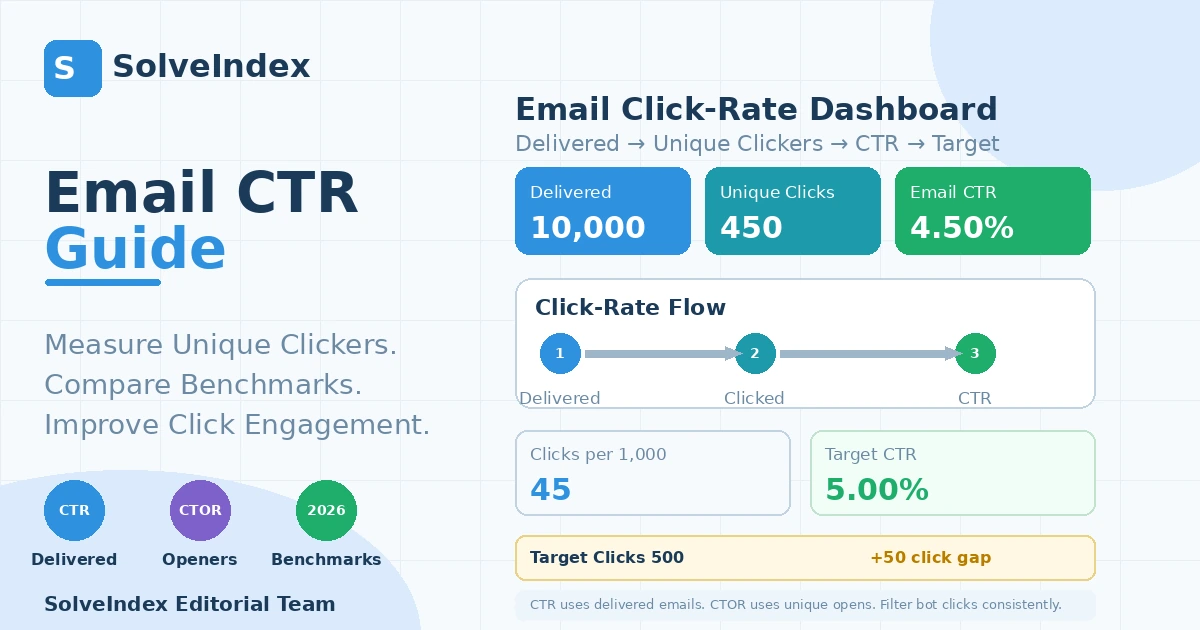
Email CTR measures unique click engagement across successfully delivered recipients. The formula is simple, but reliable interpretation requires consistent unique-click counting, a clear delivered-email denominator, awareness of bot/security clicks, and benchmark context that matches the message type.
What Email CTR Measures
Email click-through rate (CTR), also called email click rate in many platforms, measures the share of successfully delivered recipients who became unique clickers. A click is a stronger interaction than a recorded open because the recipient selected a tracked link, but it still stops before a purchase, signup or other conversion.
Email CTR / Click Rate Formula
Email CTR formulas
Email CTR = Unique Clickers / Delivered Emails × 100Clicks per 1,000 Delivered = Unique Clickers / Delivered Emails × 1,000Target Clicks = Delivered Emails × Target CTRFor the delivered-recipient model used by SolveIndex, Email CTR = Unique Clickers ÷ Delivered Emails × 100. Keep the numerator and denominator from the same campaign or reporting window. If 10,000 emails were delivered and 450 unique recipients clicked, CTR is 4.50%.
Unique Clicks vs Total Clicks
Unique clickers count each recipient once even if that person clicks several links or returns to the same link multiple times. Total clicks count every recorded click event. For recipient-level CTR, unique clickers are usually the cleaner numerator because repeat clicking does not inflate the rate.
A recipient who clicks five times should not count as five people when the question is “what share of delivered recipients clicked?” That is why unique clickers are useful for campaign-rate comparisons. Total clicks still matter for link-level analysis, repeated product interest and navigation behavior, but they should be reported as a separate event-count metric.
Why Delivered Emails Are the Denominator
Delivered emails exclude known bounces and represent the audience that could reasonably click. Mailchimp defines click rate as the percentage of successfully delivered messages that registered at least one click, and Klaviyo campaign reporting uses unique clicks divided by delivered emails. If your provider uses another label or denominator, compare formulas rather than metric names.
Using sent emails instead of delivered emails can slightly depress the rate when bounces are present, while using openers creates a different metric entirely. Before importing data, verify that “delivered” excludes failed delivery attempts and that your unique-click count covers the same message population and time window.
Email CTR vs Email Click Rate: Check the Platform Definition
The same delivered-email metric may be labeled click rate, click-through rate or CTR depending on the platform, report or article. SolveIndex uses CTR as shorthand for unique clickers divided by delivered emails. CTOR is deliberately separate and uses unique openers as the denominator.
This naming issue matters when exporting data from multiple ESPs or agencies. One dashboard may say click rate while another says CTR, but those values are comparable only if both use the same delivered-email denominator and unique-click numerator. Document the formula in reports so a label change does not look like a performance change.
Worked Email CTR Example
With 10,000 delivered emails and 450 unique clickers, CTR is 4.50%. That equals 45 unique clickers per 1,000 delivered. A 5.00% target would require 500 unique clickers, so the current campaign is 50 clicks below the target.
The 5% target in the calculator is a reproducible planning example, not a universal benchmark. Current 2026 campaign averages are materially lower than 5%, while many automated flows are higher.
Clicks per 1,000 Delivered
Clicks per 1,000 delivered is the same rate expressed as a count instead of a percentage. It is often easier to explain operationally: a 4.50% CTR means about 45 unique clickers for every 1,000 successfully delivered emails. This can help translate small percentage changes into expected click volume.
How to Use a Target Email CTR
A target should come from a comparable campaign type, audience and historical baseline rather than a universal number. Broadcast campaigns, newsletters, welcome flows, abandoned-cart flows and highly segmented lifecycle messages can produce very different click behavior. Use the target to estimate required clicks, then investigate the gap rather than treating the target as a grade.
For planning, convert a target percentage into a click count. With 10,000 delivered emails, each 0.10 percentage-point movement equals 10 unique clickers. This makes the target easier to operationalize: instead of debating whether 4.5% “looks good,” you can ask what campaign or audience change could plausibly create 50 additional qualified clicks.
What Is a Good Email CTR?
There is no single good email CTR for every sender. Campaign purpose, audience intent, industry, offer strength, automation timing and segmentation all matter. Current benchmark data is useful context, but your own comparable history and downstream conversions are the most relevant decision references.
A higher CTR is not automatically better if the extra clicks are low quality. A highly promotional subject line or curiosity-heavy CTA can increase clicks while decreasing conversion quality. Judge “good” performance with at least one downstream outcome such as conversion rate, placed-order rate, qualified lead rate, revenue per recipient or ROI.
2026 Email Click-Rate Benchmarks
Klaviyo’s 2026 benchmark analysis of more than 205,000 brands reports an average campaign email click rate of 1.69% and a top-10% campaign rate of 3.38%. Automated flows are materially higher: 5.58% on average and 10.48% for the top 10%. These figures are ecommerce-oriented benchmark context, not universal targets for every list or industry.
The same Klaviyo benchmark report shows that campaign click-rate averages by listed ecommerce industry cluster around roughly 1.2% to 2.0%, while automated flows cluster around roughly 4.8% to 6.1%. This spread reinforces why the send type must be identified before a benchmark is applied to a specific program.
Email CTR by Industry
Industry averages vary because products, purchase frequency, audience intent and campaign mix differ. Klaviyo’s 2026 campaign averages span roughly the low-1% to low-2% range across listed ecommerce industries, while automated-flow click rates are much higher. Compare the closest business and message type you can, not just the all-industry average.
Industry tables are descriptive, not guarantees. A brand with a narrow high-intent subscriber segment can outperform its category average, while a broad acquisition list can underperform even with similar creative. Use benchmark data as a sanity check, then prioritize your own segmented historical baseline for decision-making.
Campaign vs Automated-Flow Click Rates
Automated flows often outperform one-off campaigns because they are triggered by user behavior or lifecycle timing. Klaviyo’s 2026 dataset shows more than a threefold average click-rate difference between flows and campaigns. A 5% target may therefore be realistic in some flows but unusually aggressive for a broad broadcast campaign.
Triggered flows also differ from one another. A cart-abandonment message reaches people who recently demonstrated purchase intent, while a re-engagement flow targets colder recipients. Even inside automation, compare like with like when deciding whether the CTR is strong or weak.
Newsletter and B2B Context
Newsletter and B2B programs can have different objectives from ecommerce promotional campaigns. A newsletter may optimize for recurring readership and a few high-value clicks, while a B2B nurture email may prioritize qualified account engagement over raw click volume. Preserve the same formula, but use a benchmark that matches the purpose.
For B2B, one click from a high-value buying committee can be more valuable than dozens of low-intent clicks from a broad list. Track who clicked, what they clicked, and what happened next. For newsletters, useful measures can include return visits, content depth, assisted conversions and subscriber retention alongside CTR.
Email CTR vs Open Rate
Open rate measures recorded opens among delivered emails; CTR measures unique clickers among delivered emails. A campaign can have a strong open rate but weak CTR if the subject line attracts attention while the offer, content or call to action fails to generate clicks.
Email CTR vs CTOR
CTR uses delivered emails as the denominator. CTOR, or click-to-open rate, uses unique openers. CTOR isolates post-open engagement, while CTR reflects the entire delivered audience. Do not divide clicks by opens and call the result CTR in this SolveIndex model.
Email CTR vs Email Conversion Rate
CTR answers whether recipients clicked. Conversion rate answers whether the chosen business action occurred. High CTR with weak conversion can indicate landing-page friction, message-to-offer mismatch, low-intent curiosity clicks or attribution differences.
Email CTR vs Email Marketing ROI
CTR is an engagement metric, not a profitability metric. More clicks can be useful, but financial value depends on conversion quality, revenue, margin and campaign cost. Validate click improvements with conversion value and ROI before scaling spend or send volume.
Bot and Security-Scanner Clicks
Security software and inbox providers can automatically follow links to inspect them for threats. These bot clicks can inflate unique clicks, click rate and attribution. Mailchimp recommends excluding bot activity where possible, and Klaviyo provides bot-click filtering that can change click-rate reporting. Keep bot-filtering settings consistent across periods.
A sudden click-rate spike without a matching rise in site sessions or conversions can be a clue that machine clicks are involved. Review your provider’s bot-click settings and, where possible, compare human-click-only reporting with site analytics. Avoid changing the filtering policy mid-test because that can alter the measured winner.
Click Tracking and Measurement Consistency
Click tracking typically relies on tracked redirect links. If tracking is disabled for some links, links are rewritten differently, or reporting settings change, click counts may not be comparable. Keep the same provider, link-tracking configuration, bot-filtering policy and reporting scope when analyzing trends.
Link redirect systems, privacy tools and security products can all affect recorded events. When a link is not tracked, the recipient may still visit the destination without appearing in the email click count. For this reason, CTR should be treated as a tracked interaction metric rather than a perfect census of every visit caused by the email.
CTA Design and Message-to-Link Relevance
The primary call to action should be easy to find, specific and aligned with the promise of the email. Clicks usually improve when the recipient immediately understands what happens next and why the destination is worth visiting. Benefit-oriented CTA language can be tested against generic labels.
A strong CTA usually answers three questions quickly: what should I do, what do I get, and why now? Button styling can help visibility, but wording and relevance are often more important than decoration. If several links compete for attention, designate one primary action and use secondary links for genuinely different user needs.
Link Placement and Choice Overload
Adding more links does not automatically create more useful clicks. Too many competing choices can dilute attention, while one overly narrow path may not fit the audience. Use a clear primary action, place important links where they are visible, and keep secondary options purposeful.
If the email contains many products, categories or content links, inspect link-level performance rather than only the overall CTR. One strong link can carry the entire campaign while others add distraction. Click maps and URL-level reports can reveal which part of the email generated the interaction.
Segmentation and Personalization
A relevant offer is easier to click. Segment by lifecycle stage, past purchases, browsing behavior, product interest, geography or other meaningful first-party signals when appropriate. Personalization should improve relevance, not simply add a name token.
Segmentation can raise CTR by reducing irrelevant messages, but overly narrow segments can create noisy percentages from small samples. Balance relevance with enough recipients to measure changes. Keep segment definitions stable during comparisons or document when the audience logic changed.
Mobile Experience After the Click
CTR can suffer when buttons are hard to tap, the email is cluttered on a small screen, or the landing page loads poorly. Evaluate the email and destination together. A click is only the transition between inbox and site, so mobile friction can reduce both click confidence and post-click conversion.
Email CTR is influenced by both the message and the handoff. Large tap targets, readable copy, fast destination pages and consistent offer language reduce friction. If mobile CTR or post-click conversion is weak, inspect rendering and destination performance before rewriting the entire campaign.
A/B Testing and Sample Size
Test one meaningful variable at a time where possible: CTA copy, offer framing, layout, image treatment, link placement or segment. Small lists can produce large percentage swings from only a few clicks, so avoid overreacting to one send without enough volume or repeated evidence.
Use absolute click counts as well as percentages when judging tests. A move from 2.0% to 2.4% looks like a 20% relative lift, but on a 500-recipient test group it represents only two additional clickers. Larger samples and repeated tests provide a more stable basis for rollout decisions.
How to Improve Email CTR
Start with relevance before cosmetic changes. Clarify the offer, make the primary CTA prominent, reduce unnecessary link choices, segment the audience, personalize useful content, ensure mobile usability, and test systematically. Klaviyo’s 2026 guidance also emphasizes CTA visibility, personalization and avoiding choice overload.
Prioritize changes with a clear behavioral hypothesis. For example: “Move the primary CTA above the long product grid so more recipients see it before scrolling,” or “Segment recent browsers by category so the linked offer matches demonstrated interest.” Specific hypotheses make the result easier to learn from.
Why Did My Email CTR Suddenly Change?
Check what changed before the movement: audience composition, offer, CTA placement, send type, automation trigger, link tracking, bot filtering, mobile rendering, seasonality or landing-page destination. A reporting-setting change can create an apparent performance change even when recipient behavior stayed similar.
Also check whether the denominator changed. Deliverability improvements can increase delivered emails faster than unique clicks, reducing CTR even when the absolute number of clickers rises. The opposite can happen if deliverability falls. Review the rate and the underlying counts together.
Common Email CTR Reporting Mistakes
Common mistakes include using total clicks in one period and unique clicks in another, dividing by opens and calling the result CTR, comparing campaign CTR with flow CTR without context, ignoring bot clicks, mixing delivered and sent denominators, and celebrating higher CTR without checking conversions.
Practical Email CTR Reporting Workflow
For each comparable send, record delivered emails and unique clickers, calculate CTR and clicks per 1,000, compare against the same campaign type or segment, inspect bot filtering and tracking settings, review CTOR and conversion rate, and document changes to audience, creative, offer and destination before making conclusions.
A useful weekly or campaign-level report can include delivered emails, unique clickers, CTR, clicks per 1,000, CTOR, conversion rate, conversion value and bot-filtering status. This keeps the click metric connected to both upstream reach and downstream business outcomes.
Frequently Asked Questions
Sources and Methodology
SolveIndex cross-checked email click-rate definitions and reporting behavior against Mailchimp open/click-rate guidance, Mailchimp click-tracking documentation, Klaviyo campaign trend reporting, Klaviyo unique-vs-total click documentation, Klaviyo 2026 email benchmarks, Klaviyo bot-click guidance, with platform-specific labels treated as secondary to the actual numerator and denominator. Benchmark figures are contextual references, not universal targets.
Reviewed September 16, 2026. The calculator does not connect to an email service provider or filter bot clicks itself; it calculates from the delivered-email and unique-click values entered by the user.
Use the Email CTR Calculator
Enter your own campaign values to calculate the metric and review the visual and calculation breakdown.
Open the Email CTR Calculator