What a Google Ads Budget Actually Controls
A Google Ads budget controls how much a campaign is allowed to spend, but it does not directly guarantee clicks, conversions or revenue. Auction prices, search demand, targeting, bidding strategy, ad quality and conversion behavior determine how much performance can be purchased with that budget. For planning, it is useful to work backward from a business outcome instead of starting with an arbitrary dollar amount.
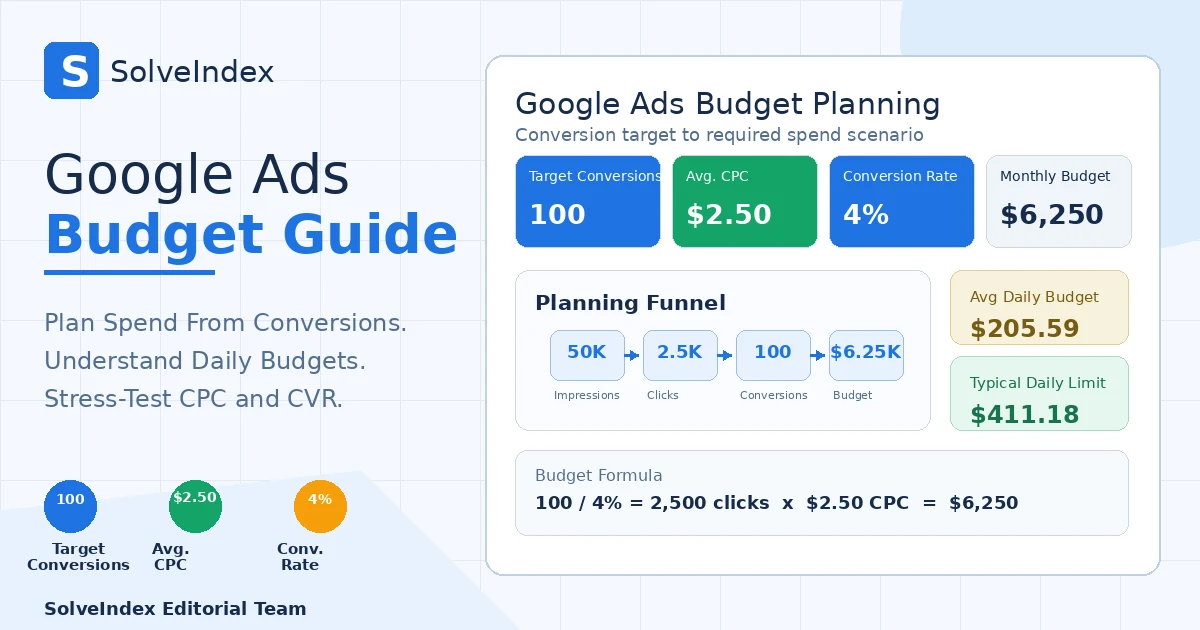
The matching Google Ads Budget Calculator starts with target conversions, expected average CPC and expected conversion rate. That keeps the calculation transparent: conversions imply a required click volume, click volume implies spend, and spend can then be translated into an average daily budget.
Google Ads Budget Formula
This formula chain is a scenario model. It does not predict the auctions Google Ads will make available at a particular budget. Its strength is that every assumption is visible and can be stress-tested before money is committed.
How to Calculate a Google Ads Budget From Conversions
Start with the monthly conversion action that matters to the business. If you need 100 purchases and expect a 4% conversion rate from paid clicks, you need 2,500 clicks. If comparable traffic costs an average of $2.50 per click, those clicks imply about $6,250 of monthly ad spend.
This approach is more informative than choosing a round number such as $5,000 and hoping it is enough. It also exposes the two assumptions that most strongly move the required spend: CPC and conversion rate.
Worked Google Ads Budget Example
Suppose a campaign targets 100 monthly conversions, expects a 4% conversion rate and expects $2.50 average CPC. Required clicks are 100 / 0.04 = 2,500. Estimated monthly spend is 2,500 x $2.50 = $6,250. Dividing by 30.4 gives an average daily budget of about $205.59. The implied CPA is $62.50.
If expected CTR is 5%, the same 2,500 clicks correspond to about 50,000 impressions. CTR is therefore useful for an impression scenario, but it is not required for the budget calculation when CPC is already known.
Google Ads Budget Calculator Inputs
| Input | Use it this way | Main risk |
|---|---|---|
| Target monthly conversions | Use one defined conversion action such as purchases, qualified leads or booked calls. | Mixing actions with different values makes the budget target ambiguous. |
| Expected average CPC | Use comparable account history, Keyword Planner context or a conservative test assumption. | Using only a max CPC bid can overstate or understate actual average cost. |
| Expected conversion rate | Use the rate for the same traffic type and conversion action. | Borrowing a branded or retargeting conversion rate for cold traffic can understate required spend. |
| Expected CTR | Optional. Use only to convert required clicks into an impression scenario. | CTR does not make the budget forecast more certain. |
Average Daily Budget in Google Ads
Google Ads uses an average daily budget as the campaign-level spending setting for many campaign types. It is an average, not a promise that every calendar day will cost exactly that amount. Google can spend more on high-opportunity days and less on other days, subject to the applicable spending limits.
For planning, the calculator converts a monthly spend scenario into an average daily budget so the result can be compared with the campaign setting you actually enter in Google Ads.
Monthly Budget and the 30.4-Day Convention
Google documents 30.4 as the average number of days in a month for relating average daily budget to monthly spending limits. That is why the calculator uses monthly spend / 30.4 rather than dividing by 30 or by the exact number of days in one calendar month.
This is a platform budgeting convention, not an accounting rule. If your internal finance plan uses calendar-month cash caps, reconcile the Google Ads pacing convention with your own cash-management process.
Daily Spending Limit for Most Campaigns
For most campaigns, Google states that daily spend can reach up to two times the average daily budget. That means an average daily budget of $205.59 can have a typical daily spending limit around $411.18. It does not mean Google will spend that amount every day.
The calculator shows this 2x figure as a planning reference and labels it for most campaigns because Google documents exceptions for certain campaign and budget types.
Monthly Spending Limit
For most campaigns using an average daily budget, the monthly spending limit is generally 30.4 times that average daily budget. Daily volatility can therefore be balanced across the month while the monthly charging limit remains tied to the budget setting.
If you change the average daily budget during the month, review the Budget Report because the monthly spend path and limits can change with those budget edits.
Google Ads Budget Report
Google Ads provides a Budget Report that can show cumulative monthly spend, the monthly spending limit, cost to date and a monthly forecast. This is more useful for live campaign pacing than assuming the calculator scenario will remain accurate after launch.
Use the calculator before or during planning, then use the Budget Report to reconcile the model with actual delivery and pacing.
How Much Should You Spend on Google Ads?
There is no universal dollar amount that every advertiser should spend. A defensible budget starts with economics and data: the number of conversions you want, what a conversion is worth, the CPC you are likely to face, the conversion rate you can reasonably expect and how much cash you can risk while the campaign learns.
A small business with high-value leads may rationally spend more per click than an ecommerce store with thin margin. The useful question is not whether a budget is high or low in isolation, but whether the implied CPA and required ROAS are acceptable for the business.
Is There a Minimum Google Ads Budget?
Google states there is no single minimum spending commitment for Google Ads as a whole. You set and control your own budget. However, a budget can still be too small to generate meaningful traffic for the keywords, geography, campaign type and bidding goal you selected.
Some campaign types can have their own recommendations or floors, so avoid turning one campaign-specific rule into a universal minimum. Use your own CPC and conversion assumptions to estimate what level of spend is capable of producing enough data for your objective.
Google Ads Budget Recommendations
Google can recommend higher budgets based on recent performance, current budget, keyword list and targeting. These recommendations are account-specific simulations, not universal benchmarks. A recommendation can identify additional traffic opportunity, but you still need to decide whether that traffic fits your CPA, ROAS, margin and cash constraints.
Treat a recommended budget as an input to analysis, not an automatic instruction to increase spend.
What Limited by Budget Means
A campaign marked Limited by budget is active but is not showing as often as it potentially could because the average daily budget is below the amount needed to capture all eligible traffic for the current settings. Google may reduce serving frequency so the campaign can stay within the budget.
Limited by budget does not automatically mean the campaign is unprofitable or that the budget must be raised. Review conversion quality, CPA, ROAS and incremental demand before deciding whether more spend is useful.
2026 Update for Target-Based Bidding When Budget Is Limited
Google rolled out changes in August 2026 for campaigns that are Limited by budget and use target-based bidding such as Target CPA or Target ROAS. Google says the updated behavior is intended to make performance more consistent toward the stated bid target when budgets change. The rollout was completed globally in late August 2026.
This matters for budget planning because older assumptions about a target-based campaign overachieving its target while budget constrained may no longer describe current behavior. Google does not automatically change your budget or bid target, so review both settings together.
Budget Pacing and Monthly Forecasts
Budget pacing asks whether current spend is on track relative to the month and the campaign's available demand. Google Ads budget pacing insights can surface statuses such as Limited by budget, budget remaining and on track, along with monthly performance forecasts based on historical performance, seasonality and market trends.
A planning spreadsheet or calculator cannot replace that live pacing signal because it does not have auction-level account data.
Using Performance Planner for Budget Decisions
Performance Planner can create advertising-spend plans and estimate how changes to eligible campaigns might affect performance. Google says forecasts are refreshed daily and use recent performance adjusted for seasonality. This makes it a stronger account-specific forecasting tool than a static calculator when the campaign type is supported.
Use the SolveIndex calculator for transparent scenario math, then compare the output with Performance Planner rather than treating the two tools as substitutes.
Performance Planner Scope Changed in 2026
Effective March 9, 2026, Google says Performance Planner no longer supports planning for Display and Video campaigns or plans based on impression-share metrics. If you are budgeting those campaign types, do not assume the Planner will provide the same coverage it once did.
For supported campaigns, account-specific forecasts can still be valuable. For unsupported scenarios, use historical data, campaign-specific planning tools and transparent sensitivity analysis.
How CPC Changes the Required Budget
CPC changes budget linearly when the conversion target and conversion rate are held constant. In the default example, 2,500 required clicks at $2.50 CPC cost $6,250. If CPC rises to $3.00, the same click target costs $7,500. If CPC falls to $2.00, it costs $5,000.
Use the CPC Calculator to measure actual click cost and compare the planning assumption with real account performance.
How Conversion Rate Changes the Required Budget
Conversion rate changes the number of clicks needed per conversion. At 4%, one conversion requires 25 clicks on average. At 5%, it requires 20 clicks. With $2.50 CPC and a 100-conversion target, improving conversion rate from 4% to 5% reduces the modeled spend from $6,250 to $5,000.
Do not assume a conversion-rate improvement is free or permanent. Landing-page changes, offer changes and traffic mix can also change CPC, conversion quality and value.
Budget and CPA
The calculator's implied CPA is monthly spend divided by target conversions. With $6,250 of modeled spend and 100 target conversions, implied CPA is $62.50. The same result can be derived from CPC / conversion rate as a decimal: $2.50 / 0.04 = $62.50.
Use the CPA Calculator when you need to compare actual or target acquisition cost directly. A budget that produces an unacceptable implied CPA should be reconsidered before scale becomes the goal.
CTR and the Optional Impression Scenario
CTR is optional in this budget model because CPC already prices the required clicks. When CTR is entered, the calculator estimates how many impressions would be associated with that click volume if CTR stayed constant. At 2,500 clicks and 5% CTR, the scenario is 50,000 impressions.
This is not a forecast of search volume, impression share or Ad Rank. Use the Google Ads CTR Calculator to analyze click-through rate separately.
Connect Budget to ROAS and Break-Even ROAS
Budget planning answers how much spend may be required, not whether that spend is profitable. After estimating the budget, compare the expected conversion value with the ROAS Calculator and compare your margin economics with the Break-Even ROAS Calculator.
A campaign can hit the conversion target and still destroy value if conversion value is too low or contribution margin is too thin. Budget, CPA and ROAS should therefore be reviewed as one connected decision chain.
Average Daily, Shared, Campaign Total and Account Budgets
Google Ads supports more than one budget concept. Average daily budgets are common at campaign level. Shared budgets can distribute one average daily budget across multiple campaigns. Campaign total budgets are available for certain campaign types and durations. Account budgets are a separate invoicing feature for eligible advertisers using monthly invoicing.
Do not treat all of these as interchangeable. The SolveIndex calculator models a monthly planning amount translated into an average daily budget; it does not model every Google Ads billing arrangement.
Why Budget Does Not Scale Performance Linearly Forever
Doubling budget does not guarantee double the clicks or conversions. As spend expands, you can enter more expensive auctions, reach lower-intent queries, saturate audiences or encounter limited search demand. Smart Bidding can also change bids as the campaign attempts to achieve its target.
Treat the calculator as a local scenario around your assumptions. The farther the proposed spend is from the data used to estimate CPC and conversion rate, the wider the uncertainty should be.
Google Ads Budget Scenario Analysis
| Scenario | CPC | Conversion Rate | Target Conversions | Modeled Spend | Implied CPA |
|---|---|---|---|---|---|
| Base | $2.50 | 4% | 100 | $6,250 | $62.50 |
| CPC +20% | $3.00 | 4% | 100 | $7,500 | $75.00 |
| CVR improves | $2.50 | 5% | 100 | $5,000 | $50.00 |
| Higher target | $2.50 | 4% | 150 | $9,375 | $62.50 |
Change one assumption at a time before combining changes. This shows which variable is responsible for the budget movement and prevents a sensitivity test from being mistaken for a forecast.
Common Google Ads Budget Planning Mistakes
- Starting with a round budget and calling whatever volume it buys a business target.
- Using maximum CPC instead of expected average CPC.
- Using a conversion rate from a different network, location, device mix or conversion action.
- Assuming the average daily budget will be spent exactly every day.
- Ignoring the 30.4-day monthly budgeting convention.
- Treating a budget recommendation as proof that more spend will be profitable.
- Assuming Limited by budget means the campaign must be scaled.
- Projecting performance linearly across a much larger budget without auction or demand uncertainty.
Practical Google Ads Budget Planning Workflow
- Define one conversion action and a monthly business target.
- Pull average CPC and conversion rate from the most comparable historical segment available.
- Run the base budget calculation and check implied CPA.
- Stress-test higher CPC and lower conversion-rate cases before launch.
- Compare implied CPA and expected ROAS with business economics.
- Translate the monthly scenario into an average daily budget using 30.4.
- Launch conservatively enough to monitor conversion quality and tracking.
- Review the Budget Report, Limited by budget status, budget pacing and account-specific planning tools.
- Replace assumptions with actual CPC and conversion rate as data accumulates.
- Recalculate after material changes to targeting, bids, offer, landing page, seasonality or conversion tracking.
Frequently Asked Questions
Sources and Methodology
SolveIndex cross-checked Google Ads budget behavior against current first-party Google documentation: average daily budgets, choosing bids and budgets, Performance Planner, Limited by budget, budget pacing insights, and 2026 changes to target-based bid strategies.
Reviewed on September 6, 2026. The SolveIndex calculator does not connect to a Google Ads account and does not predict auction supply. Its formulas are planning arithmetic based on user-entered assumptions. Reconcile modeled spend with actual account data, conversion tracking and your complete business cost structure.
Use the Google Ads Budget Calculator
Turn target conversions, expected CPC and conversion rate into a transparent monthly and average daily budget scenario, then compare implied CPA and ROAS with your economics.
Open the Google Ads Budget Calculator